


The question Salesforce consultants hear most often isn't "Should we integrate Salesforce with our ERP?" - they already know the answer is yes. The question is: how do we do it right, for our specific industry and our specific ERP, without wasting six months and a budget we don't have?
This guide is our attempt to answer that. Not at a generic, vendor-agnostic altitude, but at the level of specificity that your business actually needs, broken down by industry, ERP system, and the real-world integration decisions that separate successful projects from expensive disasters.
Before getting into the Salesforce question specifically, it's worth grounding this conversation in where the ERP market actually stands.
According to Market Reports World's 2026 ERP Software Market Analysis, the global ERP software market is valued at approximately $37.6 billion in 2026 and is projected to reach $54.9 billion by 2035, a compound annual growth rate of 4.3%.
Manufacturing and retail are the largest adopters, with manufacturing alone accounting for 28% of all ERP usage globally. Cloud-based ERP now represents the majority of new deployments, with over 78% of medium-to-large businesses in the United States running ERP platforms to manage their operations.
The academic literature reinforces why: a peer-reviewed analysis by Šimović, Varga, and Soleša (University North, Croatia, published in Ekonomija: Teorija i Praksa, 2021) identifies twenty distinct operational advantages of ERP systems, including centralized data accuracy, improved supply chain management, production flexibility, better logistics, and the connection of all related business functions; marketing, finance, accounting, order processing, HR, procurement, production, and sales, into a single system.
Their SWOT-based analysis also catalogues the real constraints: large initial investments, training costs, implementation complexity, and the organizational change required to make a new system stick. That balance of opportunity and risk is exactly what this guide is designed to help you navigate.
The data and the research both point to the same conclusion: ERP is no longer optional infrastructure. It is the operational backbone of a competitive business. The question for most of our clients isn't whether to have one, it's how to make it work alongside Salesforce.
Enterprise Resource Planning (ERP) software integrates an organization's core back-office functions: accounting, finance, HR, inventory, procurement, supply chain, and order management - into a single system with a shared database.
The fundamental promise is a "single source of truth" for operational and financial data, visible across every department simultaneously.
Salesforce is not an ERP. It never claimed to be.
At its core, Salesforce is a CRM - a customer-facing system of record designed to manage leads, opportunities, contacts, service cases, and customer journeys. Its Customer 360 platform is the world's most widely used CRM for a reason: nothing touches it for managing the front-office relationship with customers.
The confusion exists because Salesforce has expanded aggressively - Revenue Cloud, MuleSoft, Field Service, Commerce Cloud - and some of those capabilities overlap with ERP territory. But even with those additions, Salesforce does not manage your general ledger, your bill of materials, your production scheduling, your warehouse, or your payroll. That's what an ERP does.
The real opportunity isn't to choose between them. It's to connect them so that your front office (Salesforce) and your back office (ERP) operate as a single, intelligent business system.
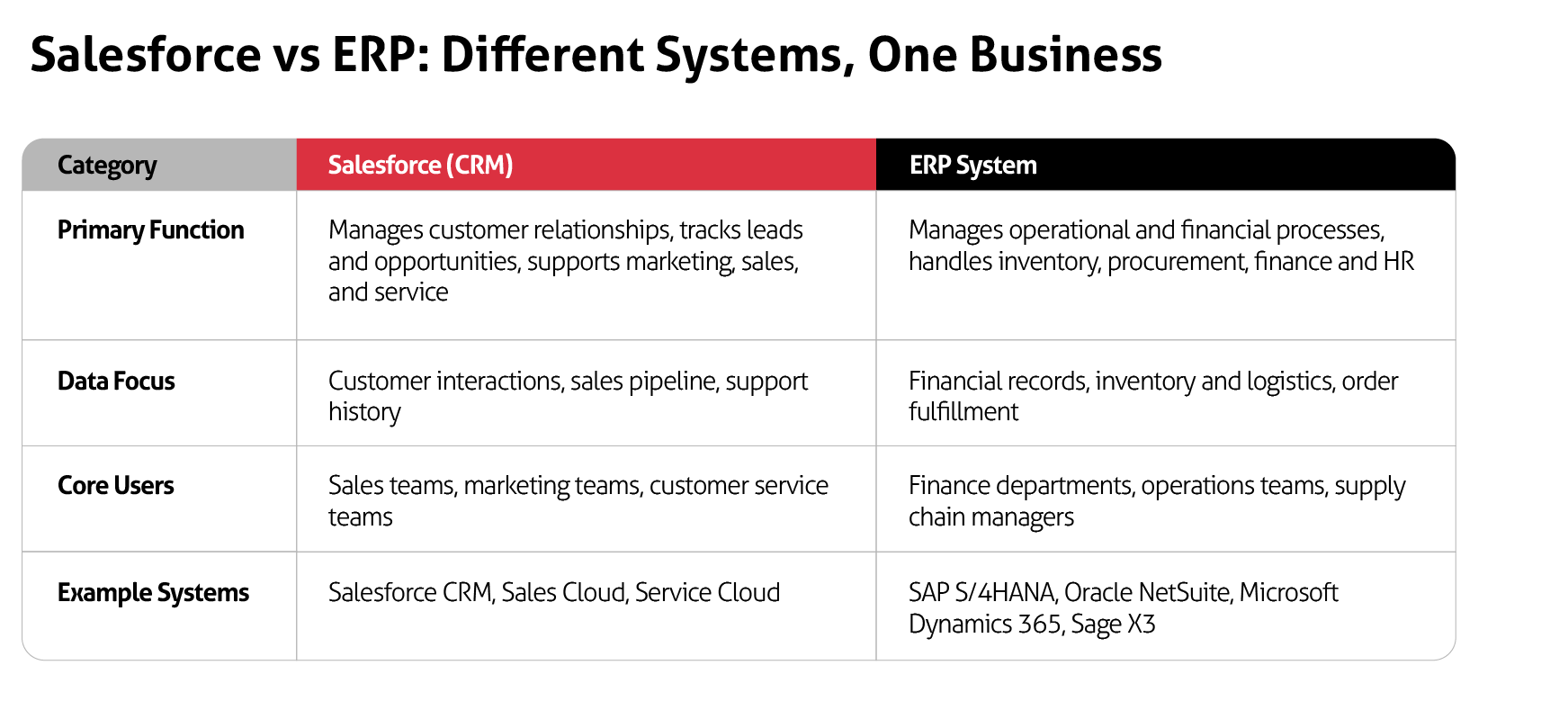
This is one of the most searched questions in the Salesforce ecosystem, and the honest answer is: not on its own, but closer than most people realize, and in one specific architecture, the line nearly disappears entirely.
Out of the box, Salesforce lacks the modules that define a true ERP: a full general ledger, accounts payable and receivable, production planning, bill of materials management, and payroll. You cannot replace your ERP with standard Salesforce.
However, there are two scenarios where Salesforce gets very close:
Salesforce + AppExchange ERP apps - AppExchange hosts a growing ecosystem of ERP-adjacent applications built natively on the Salesforce platform. These include financial management tools, inventory management apps, order management solutions, and accounting platforms that extend Salesforce's native capabilities.
For small businesses or early-stage companies, a combination of Salesforce CRM and a robust AppExchange financial app can cover many ERP use cases without a separate system.
Rootstock Cloud ERP =- Built entirely on the Salesforce platform, Rootstock is a full manufacturing ERP that runs inside Salesforce. It shares the same database, the same UI, the same security model, and the same data architecture as your Salesforce CRM.
When a sales rep closes an opportunity in Salesforce, that data is immediately visible to the production planning team in Rootstock, with no integration layer, no API call, no sync delay. For manufacturers evaluating a new ERP in 2026, this architecture deserves serious consideration.
For most mid-market and enterprise businesses, however, the right answer is a purpose-built ERP integrated with Salesforce, not Salesforce stretched to cover ERP functions it was never designed for.
A question that comes up frequently, particularly from founders evaluating their first enterprise tech stack, is whether Salesforce and an ERP are competing solutions or complementary ones. They are complementary, but they serve fundamentally different functions.
Salesforce manages the customer relationship: who your customers are, what they've bought, what they've asked for, where they are in the sales cycle, and how they feel about your service. An ERP manages the operational and financial reality of fulfilling those relationships: can you actually build or deliver what sales just promised, at what cost, and when will it hit the books?
Oracle NetSuite, for example, is often compared directly to Salesforce by companies evaluating their first cloud software platform. The right frame is not "NetSuite vs. Salesforce", it's "NetSuite as your ERP, Salesforce as your CRM, connected so that both are more valuable." A company running NetSuite without Salesforce has strong financial and operational management but limited pipeline visibility and customer engagement tooling. A company running Salesforce without NetSuite (or another ERP) has excellent customer management but limited financial control and operational visibility. Together, they cover the full business lifecycle from first contact to cash.
Most businesses that run Salesforce and an ERP as separate systems suffer from a version of the same problem: data lives in two places, and neither place is fully trusted.
Your sales team closes a deal in Salesforce, but the finance team doesn't see it until someone exports a report. Your customer service rep promises a delivery date, but they're guessing based on inventory data that's 24 hours stale. Your CFO's revenue forecast doesn't reconcile with what's actually been invoiced in the ERP until the end of the quarter.
The operational costs are real: manual data re-entry, duplicate records, delayed approvals, inaccurate quotes, and customer-facing errors that damage relationships. In our experience at ForteNext, businesses that integrate Salesforce with their ERP properly see improvements including a 40% or greater reduction in manual order entry time, a meaningful reduction in quote-to-cash cycle time, and measurably faster revenue recognition, because finance teams are working from the same real-time data as sales.
The academic research backs this up. Šimović et al. identify the key advantages of ERP implementation as including improved accuracy and reliability of data, increased processing speed, better communication between departments and subsystems, data-based planning, and improved customer and supplier relationship management. These are precisely the gains that become available when Salesforce and your ERP are sharing a live, bidirectional data connection rather than operating as silos.
This is where most guides fail you. They list a dozen ERP vendors without telling you which ones actually dominate specific verticals, why those systems are structured the way they are, and what that means for your Salesforce integration. Below is the industry-by-industry breakdown that ForteNext uses when scoping client engagements.
Manufacturing ERP is the most mature and complex category in the market. The systems here are built around production scheduling, bill of materials (BOM) management, material requirements planning (MRP), quality management, and shop floor control.
The Salesforce integration challenge in manufacturing is significant: sales teams live in Salesforce and need real-time visibility into inventory, lead times, and production capacity, while operations teams need demand signals from Salesforce to feed their planning cycles.
It's worth noting that manufacturing is the single largest ERP adopter globally, accounting for 28% of all ERP usage according to Market Reports World, and more than 70% of global manufacturers reported upgrading or planning to upgrade their ERP systems as of 2023. The integration stakes in this sector are high.
SAP S/4HANA - The enterprise standard for large and complex manufacturers. SAP's Manufacturing Execution System integrates natively with SAP ERP, and the platform handles both discrete and process manufacturing with AI-powered predictive MRP. If your business runs SAP, your Salesforce integration is most commonly achieved through MuleSoft or SAP's own middleware layer (BTP Integration Suite).
The data model is complex and the integration requires expert mapping, but it is a well-proven pattern for an experienced partner. In 2026, SAP's AI capabilities for demand-driven replenishment and vendor delivery prediction make it a forward-looking choice for enterprise manufacturers.
Oracle NetSuite - The cloud ERP that more mid-market manufacturers adopt as their first true enterprise system than any other. NetSuite serves over 43,000 customers globally and offers robust modules for production management, supply chain, order management, and warehouse management. It has strong out-of-the-box Salesforce connector support, and its cloud-native architecture makes bidirectional sync more straightforward than legacy on-premise systems.
The native Salesforce-to-NetSuite opportunity sync, where a closed-won Salesforce opportunity automatically triggers a NetSuite sales order, is one of the most commonly deployed integration patterns in manufacturing.
Epicor Kinetic (formerly Epicor ERP) - The gold standard for mid-market discrete manufacturers in the $10m–$100m revenue range. Epicor excels at engineer-to-order environments and is particularly strong in electronics, industrial equipment, and automotive supply chain. Salesforce-to-Epicor integrations typically use MuleSoft or Jitterbit and focus on syncing opportunities, quotes, and order status.
Infor CloudSuite Industrial (formerly SyteLine) - The go-to for complex engineer-to-order manufacturers, particularly dominant in industrial machinery and aerospace supply chains. CloudSuite Industrial excels at multi-level BOM management, embedded quality processes, and multi-site operations. Infor's modern microservices architecture supports API connectivity, making Salesforce integration achievable with the right middleware.
Sage X3 - A powerful ERP for midsized manufacturers with strong adoption in food and beverage, chemicals, and industrial manufacturing. Sage X3 handles both discrete and process manufacturing, with solid financial management, multi-site inventory, and supply chain capabilities.
For manufacturers that have outgrown Sage 100 or Sage 300 and aren't ready for SAP-scale complexity, X3 is a natural step up. Salesforce integration is typically delivered through MuleSoft or Boomi, focusing on quote-to-order workflows and real-time inventory sync.
Microsoft Dynamics 365 - Increasingly adopted by manufacturers already embedded in the Microsoft ecosystem. Dynamics 365 offers solid integration with Azure services and Power Platform, and its Salesforce connector ecosystem is mature in 2026. For manufacturers standardized on Microsoft 365, the overall architecture can be simplified considerably.
Acumatica Manufacturing Edition - A cloud ERP gaining significant traction with small to mid-sized manufacturers. Its consumption-based pricing (no per-user fees) and modern UI make it attractive for growing operations, and it has strong native API support for Salesforce integration.
Rootstock Cloud ERP (built on Salesforce) - Worth special mention. Rootstock is a full manufacturing ERP built natively on the Salesforce platform, meaning your CRM and ERP share the same database, the same UI, the same security model, and the same data architecture. There is no integration layer to build or maintain.
A closed-won Salesforce opportunity syncs natively with production planning; no API call, no middleware, no delay. Customer data, order history, production status, and sales pipeline are all visible in a single Salesforce environment. For manufacturers evaluating a new ERP implementation in 2026, this is the architecture ForteNext recommends as a first comparison point.
ERP in higher education looks nothing like manufacturing ERP. Here, the system is built around student lifecycle management, academic administration, financial aid, grant management, multi-entity finance, and HR/payroll.
The Salesforce integration use case in higher ed is typically focused on enrollment: using Salesforce (or Salesforce Education Cloud) as the student engagement and recruitment CRM, and integrating it with the ERP to pass enrollment records, financial aid data, and student accounts in a managed, compliant way.
Ellucian Banner - Holds the largest share of the higher education finance ERP market, with 44% of institutions using Ellucian products according to EDUCAUSE data. Banner's footprint spans finance, HR/payroll, procurement, and student information systems with data models natively structured around academic calendars and degree programs. Salesforce-to-Banner integrations are well-precedented; the key complexity is data governance around FERPA compliance.
Oracle PeopleSoft - The dominant choice for large, research-intensive universities with global campuses and complex grant management requirements. PeopleSoft's student lifecycle and multi-campus finance capabilities are deep, and Oracle's cloud migration path keeps it relevant.
Salesforce integrations with PeopleSoft typically use MuleSoft and focus on syncing enrollment events, application data, and student financial records.
Workday - The most modern financial and HR management platform in higher education, increasingly displacing PeopleSoft at large universities that want a cleaner cloud architecture. Workday has over 600 third-party integration capabilities and strong people analytics, and its Salesforce connector story is mature. The key use case is syncing HR data and student financial management records.
Unit4 ERP - Highly customizable and well-suited for universities with complex departmental structures and federal/state reporting requirements. Its ability to automate large journal entry processes and handle multi-source funding makes it attractive for institutions managing complex grant portfolios.
Jenzabar - Purpose-built for smaller colleges and community colleges, Jenzabar offers strong student information system capabilities alongside finance and HR modules. For smaller institutions using Salesforce for enrollment marketing, a Salesforce-to-Jenzabar integration covers the handoff from prospect to enrolled student.
Retail ERP integration with Salesforce centers on one core problem: your customers experience your brand as a single entity, but your inventory, pricing, order fulfillment, and financial data live across multiple disconnected systems.
The Salesforce integration goal in retail is to give your customer service and sales teams real-time access to what's in stock, where a customer's order is, and what their purchase history looks like, without switching systems.
SAP S/4HANA (retail edition) - SAP's retail offering supports end-to-end retail operations including omnichannel fulfillment, RFID-enabled inventory management, and AI-powered demand forecasting. It's built for large-scale retailers and handles the complexity of multi-location inventory across stores, warehouses, and distribution centers. For enterprise retailers running Salesforce Commerce Cloud alongside SAP, MuleSoft is the natural integration layer.
Oracle NetSuite - A strong cloud ERP for mid-market multi-channel retailers. NetSuite's real-time financial and inventory data pairs well with Salesforce CRM for customer-facing operations, and it has proven integration pathways for syncing order status, customer account data, and financial records. NetSuite's native Salesforce opportunity sync is one of the platform's most-used integration features for retail operations.
Microsoft Dynamics 365 Business Central - The most popular ERP among small to mid-sized retailers with a Microsoft-centric tech stack. Dynamics 365 integrates cleanly with Salesforce via Boomi or MuleSoft and is well-suited for retailers who want strong financial management and inventory control without the cost and complexity of enterprise platforms. In 2026, Dynamics 365's Copilot AI capabilities add meaningful automation to order management and demand forecasting.
Infor M3 and CloudSuite Retail - Infor's retail ERP is purpose-built for large omnichannel retailers and distributors needing advanced analytics and multi-country, multi-currency operations. M3 supports B2B and B2C wholesale distribution and has Salesforce connector options through Jitterbit and MuleSoft.
Brightpearl - An automation-first ERP designed specifically for retail and wholesale, with strong multi-channel order management and built-in workflow automation. Brightpearl's API-first architecture makes Salesforce integration technically straightforward.
Acumatica Retail Edition - Well-suited for growing mid-market retailers prioritizing flexibility and modern UX, with consumption-based pricing that scales with business growth.
Fintech ERP is a category unto itself. Traditional ERP vendors were never built for payment processors, neobanks, lending platforms, or insurance technology companies. The specific demands: high transaction volumes, multi-entity consolidation, regulatory compliance (SOX, Basel III, IFRS 9/17, ASC 606), and the need to integrate with proprietary front-end systems - require careful platform selection.
The Salesforce integration use case in fintech is typically around sales pipeline and customer onboarding: deals close in Salesforce, customer entities are created in the ERP, and revenue recognition events flow back to inform forecasting and financial reporting.
Oracle NetSuite (OneWorld) - The most common ERP choice for growth-stage and mid-market fintechs. NetSuite's OneWorld handles multi-entity, multi-currency consolidation natively, and its real-time consolidation avoids the delays of period-end batch processing.
It has a meaningful installed base among investment firms, insurance agencies, and fintech companies. Salesforce integration is well-supported, and the SuiteCloud extensibility layer accommodates custom regulatory workflows.
Sage Intacct - A cloud financial management platform with deep traction in fintech, particularly for companies that need strong revenue recognition under ASC 606, multi-entity billing, and subscription revenue management.
Sage Intacct has proven successful with high-growth fintech companies and provides solid Salesforce integration through both native connectors and middleware. Its Salesforce connector syncs account, opportunity, and billing data bidirectionally, making it one of the cleaner mid-market integration stories in this sector.
SAP S/4HANA - Used by the largest and most established fintechs globally. SAP's treasury management capabilities, financial sub-ledger depth, and global localization make it the right choice for hypergrowth or enterprise-scale fintechs. Integration with Salesforce is achieved through MuleSoft or SAP BTP Integration Suite.
Workday Financial Management - Increasingly selected by fintechs that want to manage finance and HR on a single modern platform. Workday's real-time analytics, strong compliance controls, and intuitive interface appeal to tech-forward fintech teams. Its integration with Salesforce is mature and well-documented in 2026.
Microsoft Dynamics 365 - A strong option for fintech companies already standardized on the Microsoft ecosystem, offering solid financial management capabilities and Power Platform integration that can be leveraged to build custom Salesforce-to-Dynamics workflows without heavy custom development.
Distribution ERP must manage the operational complexity of receiving, storing, fulfilling, and shipping inventory across multiple warehouses, often across multiple customer types (B2B, B2C, wholesale).
The Salesforce integration goal is to give sales teams real-time access to product availability, pricing, and order status so they can make accurate commitments to customers.
Oracle NetSuite - The dominant cloud ERP for fast-growing mid-to-large distributors with high transaction volumes. NetSuite's order management, warehouse management, and demand planning modules are deep, and its integration with Salesforce =- including native opportunity-to-order sync - is among the most commonly deployed in the distribution sector.
SAP Business One - SAP's ERP for small to mid-sized distributors offers core financial management, inventory control, and purchasing capabilities. Business One's integration platform connects cleanly with Salesforce for CRM-to-ERP order handoff, and in 2026 it remains the most widely used SAP entry point for mid-market distribution businesses.
Microsoft Dynamics 365 Business Central - The most widely installed ERP among small to mid-sized US distributors. Business Central covers order-to-cash, procure-to-pay, and inventory flows, and integrates with Salesforce through both native connectors and middleware including Boomi. For distributors with barcode scanning and warehouse management needs, the Dynamics partner ecosystem has built rich add-on solutions.
Epicor Prophet 21 - Purpose-built for distribution companies, with deep industry-specific functionality for industrial, automotive, and electronics distributors. Prophet 21's wholesale distribution workflows make it a strong fit for complex distribution operations, and Salesforce integrations are typically delivered through Jitterbit or MuleSoft.
Infor CloudSuite Distribution - Built for large, complex distribution companies needing advanced supply chain collaboration, multi-site inventory management, and global compliance. MuleSoft and Boomi are the most common integration layers for Salesforce connectivity.
Sage X3 - Also a viable option in the distribution space, particularly for midsized distributors managing multi-site inventory and complex pricing. Sage X3's combination of financial depth and distribution-specific modules makes it a credible alternative to NetSuite or Dynamics for companies in the $20m–$200m revenue range.
Acumatica Distribution Edition - A flexible cloud ERP with no per-user fees gaining strong traction among growing distributors. Its open API architecture makes Salesforce integration technically accessible and maintainable.
There is no single right answer. The integration architecture that works for a 50-person fintech on NetSuite is different from the one that works for a 3,000-employee manufacturer running SAP. Here's the framework we use at ForteNext.
1. Define your integration goals before you touch a single API. The most common mistake we see is teams starting with "how" before they've nailed "what." Common objectives include automating order processing from Salesforce opportunity to ERP sales order, syncing real-time inventory levels into Salesforce for accurate quoting, triggering ERP invoicing from Salesforce billing events, and flowing financial close data back to Salesforce for sales compensation and forecasting. Get specific about which data flows matter most, and you'll make better technology decisions downstream.
2. Choose the integration method that matches your complexity and maintenance burden.
Middleware platforms (MuleSoft, Boomi, Jitterbit) - The most common and sustainable approach for business-critical integrations. MuleSoft Anypoint Platform is Salesforce's own integration layer and supports connecting Salesforce with SAP, Oracle, Workday, and virtually any other ERP system. Dell Boomi is one of the most widely deployed middleware platforms in enterprise integration and is a strong choice for organizations that want a cloud-native, low-code integration platform with extensive pre-built connectors across SAP, NetSuite, Sage X3, Dynamics 365, and others.
Boomi's visual data mapping and built-in monitoring make it particularly well suited for IT teams managing complex multi-system environments without deep custom development. Jitterbit is particularly strong for Salesforce-to-NetSuite, Salesforce-to-Dynamics, and Salesforce-to-Epicor integrations. Middleware adds cost but provides long-term maintainability, error handling, and monitoring that custom point-to-point connections simply cannot.
Salesforce AppExchange ERP connectors - AppExchange hosts a wide range of pre-built ERP integration apps for systems including NetSuite, SAP, Dynamics 365, Sage, and others. These connectors can dramatically reduce implementation time for standard integration patterns. In 2026, the AppExchange ERP connector ecosystem has matured significantly - for straightforward bidirectional syncs of accounts, orders, and inventory, an AppExchange solution is often the fastest path to value.
The trade-off is customization depth: AppExchange connectors work well for standard data flows but may require middleware augmentation for complex or non-standard workflows.
Native ERP connectors - Some ERP vendors (NetSuite, Dynamics 365) offer out-of-the-box Salesforce connectors that can accelerate initial setup. These are a good starting point for straightforward integrations but typically lack the flexibility for complex, customized data flows.
Custom APIs - Reserved for organizations with unique workflows that middleware cannot accommodate, or for situations where the target ERP has no pre-built connector ecosystem. Custom APIs are powerful but expensive to build and maintain, especially as both systems evolve.
Native Salesforce-platform ERP (Rootstock) - For manufacturing organizations considering a new ERP, building on the Salesforce platform eliminates the integration layer entirely. This is a meaningfully different architectural decision, not just a connector choice. Salesforce opportunity data syncs natively to production and inventory; no middleware, no latency, no reconciliation.
3. Establish data ownership and synchronization rules. Decide which system is the "source of truth" for each data type before you build anything. Typical conventions: customer master data lives in Salesforce, product catalog and pricing live in the ERP, opportunity and order status originate in Salesforce and flow to the ERP, inventory levels originate in the ERP and flow back to Salesforce. Blurring these boundaries is how you get data conflicts and duplicate records.
4. Choose your synchronization strategy. Real-time sync (via event-driven architecture and webhooks) is ideal for customer-facing operations where stale data causes immediate business problems: inventory availability, order status, pricing. Batch sync (scheduled jobs, often daily or every few hours) is appropriate for financial reconciliations, reporting data, and high-volume transactional records where absolute real-time isn't required. Most mature integrations use a combination of both patterns.
5. Prioritize security and compliance from day one. Salesforce ERP integration security is the area most commonly sacrificed under time pressure, and it is the one that creates the most serious post-go-live problems. The University North research explicitly flags security and maintenance costs as primary external constraints in ERP implementation - a finding that applies equally to the integration layer sitting between your ERP and Salesforce.
All data transfers should be encrypted in transit and at rest. Role-based access controls should be configured so integration service accounts only have access to the specific objects and fields they need. Audit trails of all data exchanges should be maintained for compliance reporting, especially in regulated industries like fintech and higher education.
6. Test in production-equivalent conditions before go-live. Unit testing validates individual components. End-to-end testing simulates real transactions. Performance testing stress-tests the integration at peak load volumes - critical for retailers going into holiday season, distributors during peak cycles, and fintechs experiencing growth spikes.
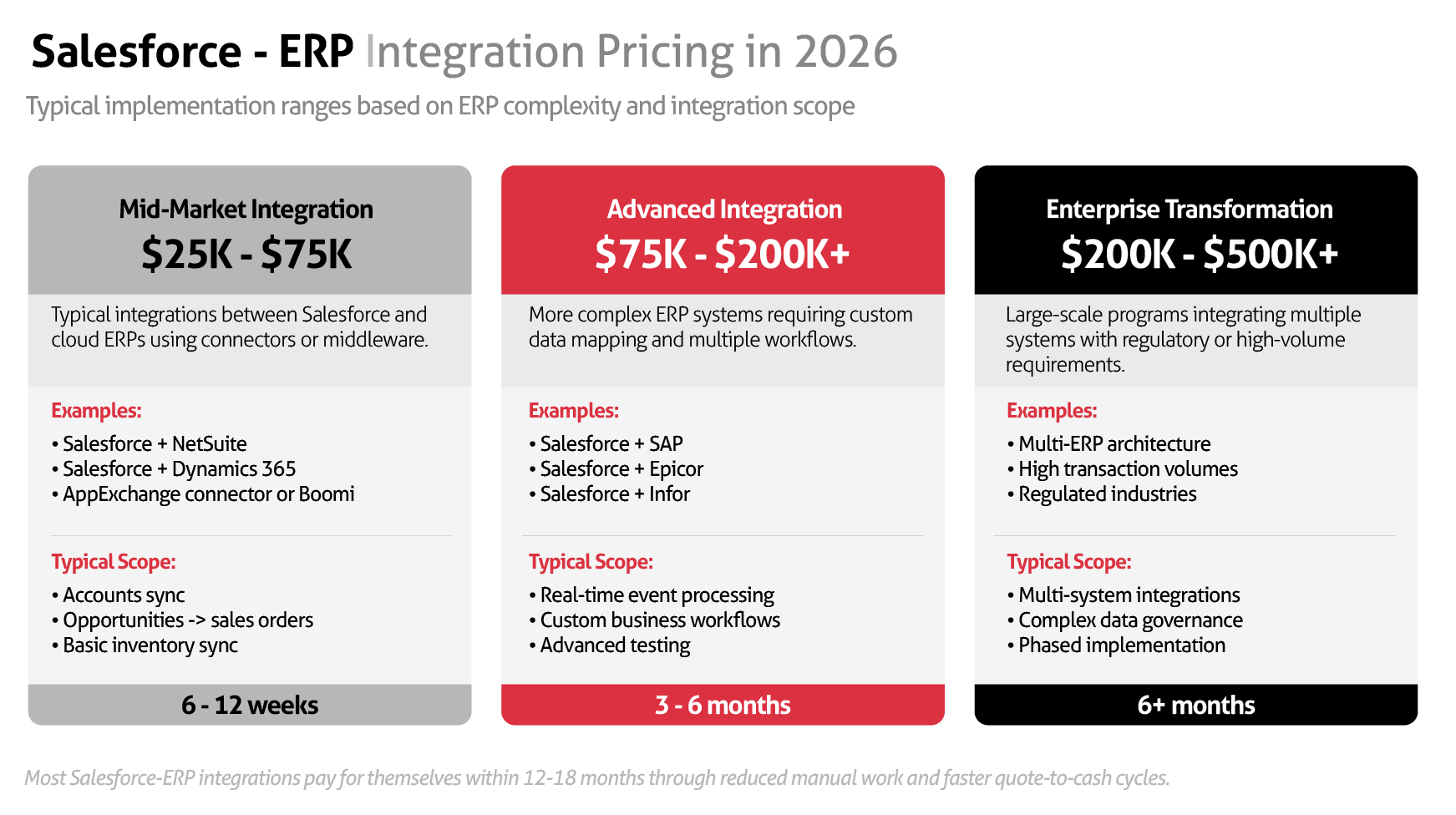
Salesforce ERP integration pricing: what to budget
Pricing is the topic most guides avoid because the variance is real and context-dependent. Here's our honest attempt at a framework.
Implementation costs vary based on ERP complexity, the number of integration touch points, whether you're using middleware or custom APIs, and how much data migration and transformation is involved.
For a focused mid-market integration - for example, Salesforce CRM connected to NetSuite or Dynamics 365 via an AppExchange connector or Boomi, covering accounts, opportunities, orders, and basic inventory sync - you're typically looking at $25,000–$75,000 in implementation services.
For a more complex integration involving SAP S/4HANA, Epicor, or Infor, with multiple data flows, custom business logic, real-time event handling, and thorough testing at scale, implementation costs typically range from $75,000–$200,000+ depending on scope.
Enterprise-scale programs involving multi-ERP environments, large data volumes, regulatory compliance requirements (common in fintech and higher education), and phased rollout can run $200,000–$500,000+ across the full program.
Ongoing costs include middleware platform licensing (MuleSoft Anypoint licensing can run from $50,000–$150,000+ annually at enterprise tiers; Boomi and Jitterbit are typically lower), monitoring and support retainers, and periodic optimization as both Salesforce and your ERP are updated.
The right frame is ROI, not cost. The University North SWOT research notes that ERP investments typically pay off when the system genuinely delivers the advantages it promises, and that the payback timeline is directly tied to the quality of implementation planning. In our experience, a well-scoped Salesforce-ERP integration business case is rarely difficult to build.
If your sales team is manually rekeying 50 orders per day into your ERP, or your finance team is spending three days per month reconciling Salesforce pipeline against ERP actuals, the labor savings alone typically justify the investment within 12–18 months, before accounting for revenue impact from faster approvals and more accurate quotes.
The data silo problem - Departments are using both systems but neither is the master. Fix: conduct a data ownership audit before integration, not after.
System incompatibility with legacy ERPs - Older on-premise ERP systems often lack modern API support. Fix: use middleware with API gateway capabilities to bridge legacy systems with Salesforce's REST architecture. This is solvable, but it requires expertise, not just a connector.
Underestimating organizational change - The University North research is clear that employee reluctance to change and poor coordination of IT departments are among the most common internal constraints in ERP implementation. The same applies to integration projects. Fix: build a change management plan into the project scope from day one. Technical integration and human adoption are both required for ROI.
Scaling failures during peak load - The integration works fine in testing but degrades under real business volume. Fix: implement pagination and data chunking for large transfers, use cloud auto-scaling for dynamic load management, and test with realistic data volumes before launch.
A well-executed Salesforce-ERP integration doesn't just clean up data. It changes what your organization is capable of.
For CTOs, it means replacing a fragile patchwork of manual exports and point-to-point scripts with a governed, monitored, documented integration architecture that your team can maintain and extend.
For VPs of Sales, it means your reps can quote accurately because they can see live inventory. It means approvals move faster because finance and ops see the same deal data. It means your sales data and your financial data tell the same story at the end of the quarter.
For heads of customer experience, it means your service agents have full order history, current order status, and account standing in Salesforce without toggling to a separate system. That's the difference between a good customer call and a great one.
For founders and CEOs, it means your management reporting actually reflects reality - because your CRM pipeline, your ERP backlog, and your financial close are all informed by the same live data.
At ForteNext, we've built our practice around a simple belief: successful Salesforce-ERP integration is not primarily a technical problem. It's an architectural decision made by people who understand both the business operations and the technology deeply.
Every engagement we run starts with a discovery process that maps your specific data flows, identifies your integration priorities, and defines the governance model before we write a single line of code or configure a single connector. We then design the integration architecture to match your ERP, your industry's compliance requirements, and your Salesforce configuration, not a generic template.
Whether you're on SAP, Oracle NetSuite, Microsoft Dynamics 365, Sage, Epicor, Infor, Ellucian, or a custom-built ERP, we've built and maintained integrations with it. The result is an integration your team can operate, extend, and trust.
If you're evaluating a Salesforce-ERP integration project in 2026, we're happy to get into the specifics with you.
Is Salesforce an ERP system? No. Salesforce is a CRM - a customer relationship management platform. It manages the front-office relationship with customers: leads, opportunities, accounts, service cases, and customer journeys. An ERP manages back-office operations: finance, accounting, HR, inventory, procurement, and supply chain. The two systems serve different but complementary functions. Salesforce is not an ERP, but it integrates with every major ERP on the market.
Can Salesforce be used as an ERP? Not as a direct replacement for a purpose-built ERP. However, Salesforce can be extended with AppExchange applications that cover financial management, inventory, and order management use cases - and Rootstock is a full manufacturing ERP built natively on the Salesforce platform that eliminates the distinction between CRM and ERP for manufacturers entirely. For most mid-market and enterprise businesses, the right answer is a purpose-built ERP integrated tightly with Salesforce.
What ERP does Salesforce use internally? Salesforce uses a combination of its own platform and third-party enterprise systems for internal operations. However, the more relevant question for most businesses is not what Salesforce uses internally, but which ERPs integrate best with Salesforce for their specific industry, and that depends entirely on your sector, company size, and existing tech stack.
How long does a Salesforce-ERP integration typically take? Timelines vary significantly based on ERP complexity, data volume, and integration scope. Straightforward middleware-based integrations between Salesforce and a cloud ERP like NetSuite or Dynamics 365 can be delivered in 6–12 weeks for a focused scope. Complex enterprise integrations involving SAP or legacy on-premise ERPs, multiple data flows, and custom business logic typically run 3–6 months. Multi-system or multi-ERP projects may take longer. At ForteNext, we always begin with a scoped discovery phase to give you a realistic timeline before commitment.
Which ERP systems integrate best with Salesforce? Oracle NetSuite, Microsoft Dynamics 365, and SAP have the most mature Salesforce integration ecosystems, with well-documented connectors, experienced middleware partners, and large implementation communities. Epicor, Infor, Workday, Sage Intacct, and Sage X3 also have established integration pathways. The question is less "which ERP integrates best with Salesforce?" and more "what integration architecture is right for your specific ERP, your data model, and your business requirements?"
What does Salesforce-ERP integration cost in 2026? A focused mid-market integration (e.g., Salesforce + NetSuite or Dynamics 365 via Boomi or an AppExchange connector) typically runs $25,000–$75,000 in implementation and managed services. Complex enterprise integrations involving SAP, Epicor, or Infor with multiple data flows and custom logic typically range from $75,000–$200,000+.
Ongoing middleware licensing (MuleSoft, Boomi, Jitterbit) adds to annual total cost of ownership. The right measure is ROI - in most cases, a well-scoped integration pays for itself within 12–18 months through labor savings and revenue impact alone.
Can Salesforce integrate with multiple ERP systems? Yes, and this is more common than people expect - particularly in organizations that have grown through acquisition or operate across multiple business units with different ERPs. MuleSoft's API-led connectivity architecture is specifically designed to manage multiple source and target systems. The integration governance model becomes more important in multi-ERP scenarios - data ownership rules must be clearly defined to avoid conflicts.
Is real-time sync between Salesforce and ERP always necessary? No, and trying to force everything into real-time can create unnecessary system load and complexity. The right approach is to use real-time event-driven sync for operations where stale data directly causes business harm (inventory availability, order status updates, pricing) and batch synchronization for data where slight lag is acceptable (financial reconciliation, reporting data, historical records). Most mature integrations use a combination of both patterns.
Alex Kolesnichenko is the CTO at ForteNext, a Salesforce implementation and integration consultancy specializing in complex ERP-to-CRM integration projects across manufacturing, higher education, retail, fintech, and distribution. ForteNext works with CTOs, VPs of Sales, heads of customer experience, and founders in the US who need Salesforce deployments that don't just configure, they connect.

Simon Wright is a B2B demand generation and content strategist with 10+ years' experience across enterprise and ecommerce. He brings a dual perspective; navigating the complexity of B2B and the pace of D2C, to help ambitious organisations turn marketing into a measurable growth engine.





